
Table of content
This is only for Resident Rooms/Apartments. This is not for Locations in your community such as common areas, etc. Those are managed under Config-Assets.
If your resident EHR such as PCC, August Health or Yardi is connected with Speak2, this is done automatically and you do not need to create Rooms unless they are needed outside of your EHR integration.
Create a Resident Room
-
Go to Config > Rooms (top right navigation)
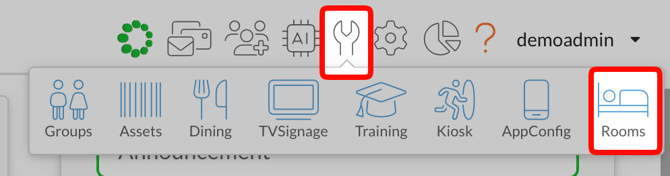
- Click "Create New"
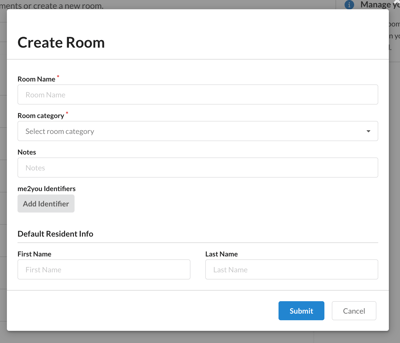
- Room Name
- Category Type/Level of Care (AL, IL, MC, Residential, Respite, SN, Hospice, Other)
- First and Last Name if you know of a resident that is assigned to this room (if not added we will create a default name)
EHR Integration
If you are synced with your EHR (PCC, Yardi, August Health, etc.) then rooms and residents will be created automatically. If you manually create rooms, there will be duplicates.
If you are not sure, ask your Speak2 Liaison or ask us! We can certainly help.
This is only for Resident Rooms. Use Assets to create locations for community spaces or your Activity Calendar.