
Table of content
The Resident record tells you all about a resident. We typically sync with your EHR to automatically manage residents (move in, move outs, room transfers, contact information). Manage their contact, profile, device and more here.
Resident Card
- Residents appear in a list on the left side
- Search or click the resident icon to view a list
- Click a name to view the specific resident
- The card will change from gray to dark blue, and move to the top of the resident list
- Off/on premise will tell you if they are currently at the community.
- Privacy will hide resident from the directory and the feed from the family app.
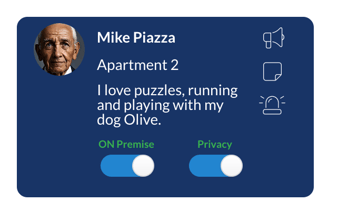
Quickly send an Announcement, Notification, or Request with the small icons on the card.
Privacy toggle is off by default. Residents show in the directory and family app users will see the feed in the app.
When the Privacy toggle is on (blue), then the resident will not show in the Directory and family will not see their feed.
Resident “notes”
Quick, brief notes that are little items that matter. Edit them in Resident Record > About > Notes or in the Staff app at the bottom of every request card. Some examples:
- Be careful with their door, cats will escape!
- Be aware that his son recently moved away
- Congratulate her on her new grandchild!
- Don't knock before 10 AM.
About Resident Record
| Summary |
Overview of the resident. View their profile information, recent orders, call logs, groups, Greeting message (if enabled), view their daily schedule and even create an order for them. |
| Address Book | Manage app contacts and any cell phone or landlines added. App Users are any Family or Neighbor app invites. WiFi contacts are outgoing only contacts. See more info here. |
| Feed |
View all interactions a resident has generated with Speak2 through the web, app, Alexa or other hardware integrations (e.g. pendants). It defaults to display today, but you can change the date filter and export. |
| Calendar |
The resident calendar displays events, any orders or requests made or accepted. You can add new events, print or export this information. When a resident asks “Alexa, What’s on the calendar?” they will be given the community calendar AND their own calendar events that day. |
| Attendance |
Weekly summary of the activities or meals attended. The first graph shows the number of attended activities for the given time period. Modify the date filter or change between Activity/Menu data. The bottom chart displays the activity, day/time, host, and participation status. |
| About |
Manage basic information about a resident - their name, apartment, email, cell, and other standard contact information. If we are integrated with your EHR, several of these fields are locked so the data stays consistent and correct. |
| Profile |
Check off the common dimensions of wellness (DoW). Select the various profile elements to connect residents to people, events and content that are most likely to interest them. |
| Dietary |
Capture dietary goals and restrictions in the resident record. As an example, if a resident is not meeting their protein goals, a specific meal can be recommended; in contrast, if a resident has a sodium restriction, a warning can be issued for a specific meal item. |
| Alexa |
Edit/manage any room to room contacts and view Alexa settings. You can change the
|
| Calls | View the recent audio and video calls from the Community or Staff app. You can view any missed, accepted or failed calls. |
To hear the community calendar AND personal calendar, say, "Alexa, what's on the calendar?"
You'll hear the community activity calendar and any events, requests, etc. added just for you.
The Profile tab is important stuff! Check off preferences and dimensions of wellness so you can recommend events, programs or they can connect with others with similar interests.
Resident Record Troubleshooting
-
What level of care or category type is the resident assigned to? Check this in their About tab.
- Is the resident added in your EHR? When were they added? We sync overnight for almost all resident information syncs.
- Is the resident assigned to a Room in their About tab?