
Table of content
Ask questions for engagement, surveys or ask specific questions like if they enjoyed the new dinner special or music program.Alexa can ask your question, and the resident will say their answer and their answer will be recorded in Reports and their Resident Record.
Use Question of the Day to create Surveys for your residents to answer. They can answer on the Neighbors app or by saying, "Alexa, open my survey".
You can even schedule questions for specific dates!
Create a Question of the Day or Survey
- Click "Question of the Day" from the left hand navigation.
- Click "Create Question of the Day" or select a spot on the Calendar
- Create your question
- Enter your start date and end date and click "Create"
- It will show up on the calendar.
Manage Questions
Click "Manage Questions" to view a list of all questions. Create additional questions, edit the question or modify the start/end date.
Question of the Day Results
View all results here. Use the calendar filter to change the date. Export your results.
Reports > Content > Question of the day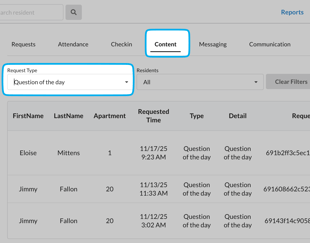
- Click "Reports" from top right corner
- Click the "Content" tab
- Filter Request Type for "Question of the Day"
- Export or filter further
Answer Survey/Question of the Day
Residents can engage in two ways.
- During the Check in, if the QOTD toggle is enabled, residents will be asked the questions of the day.
-
Residents can say "Alexa, what's the question of the day?"
- Residents can say "Alexa, open my survey"
- On the Neighbors app by clicking the Question mark icon in the bottom middle of the screen.
Residents can ask in 2 ways on Alexa by saying, "Alexa, what's the question of the day?" or "Alexa, open my survey"